No. PixelSnap is Mac-only, and its developer says there are no plans for a Windows version. The closest free match is SIVA: press Ctrl+Shift+X, drag roughly, and the box snaps to the element’s real edges, with every gap labelled. Measuring stays free forever; copying sizes as code is a 14-day-free extra, then a one-time upgrade.
Creator Kit makes SIVA.
Is There a PixelSnap for Windows?
No. PixelSnap 2 is a Mac app ($39), and its own FAQ is blunt: “There’s no Windows version and at the moment there are no plans on releasing one.” The same goes for xScope 4, the other big Mac measuring tool: version 4.7.2 runs on macOS only, and its trial needs macOS 12.3 or later.
What you actually miss on a Windows PC is a habit, not an app: drag a rough box and it snaps to the element, hold the numbers on screen, see every gap in a row, drop a guide, copy the size. Three Windows tools do the snapping part. They differ in price, in what stays on screen, and in how they handle a whole row of elements.
PixelSnap vs Windows Rulers: Quick Comparison
| Tool | Runs on | Free / Paid | Snaps to edges | Keeps measurements on screen | Copy as code |
|---|---|---|---|---|---|
| SIVAOur Pick | Windows 10/11 | Free Pro $9.99 one-time (US price; local prices vary) | Drag-to-snap, 3 tolerances | Pins, guides, row labels | CSS, Tailwind, SASS, JSON, rem (Pro) |
| EpicRuler | Windows 10, macOS | Paid ($29 one-time, per device) | Snap to edge | Hold, guidelines | width, height, colours |
| PowerToys Screen Ruler | Windows | Free | Edge detection, tolerance 0–255 | only until you cancel | click copies the value |
| PixelSnap 2 | macOS only | Paid ($39) | Drag-to-snap, tolerance mode | Hold, guides | copies dimensions |
| xScope 4 | macOS only | Paid | Rulers with edge snapping | Frames, guides | — |
Why SIVA is our pick: it is the only Windows tool here that snaps, pins and labels a whole row of gaps without paying first. We make it, so the cons below are as specific as the pros.
SIVA: The Closest Free Match to PixelSnap
SIVA is a screen ruler for Windows 10 and 11 from the Microsoft Store. It runs over any app (browser, Figma in a browser, a design file, a video frame), works offline with no account, and stays hidden from screen shares by default. Here is how each PixelSnap habit maps to it:
| On PixelSnap (Mac) | In SIVA (Windows) | Free / Paid |
|---|---|---|
| Distance between elements | Hover: SIVA reads the size under the cursor and shows the gaps to the neighbours | Free |
| Drag an area to snap to the object | Drag roughly; on release the box shrinks to the element’s real edges (Ctrl flips snapping) | Free |
| Hold dimensions on screen | Click to pin | Free |
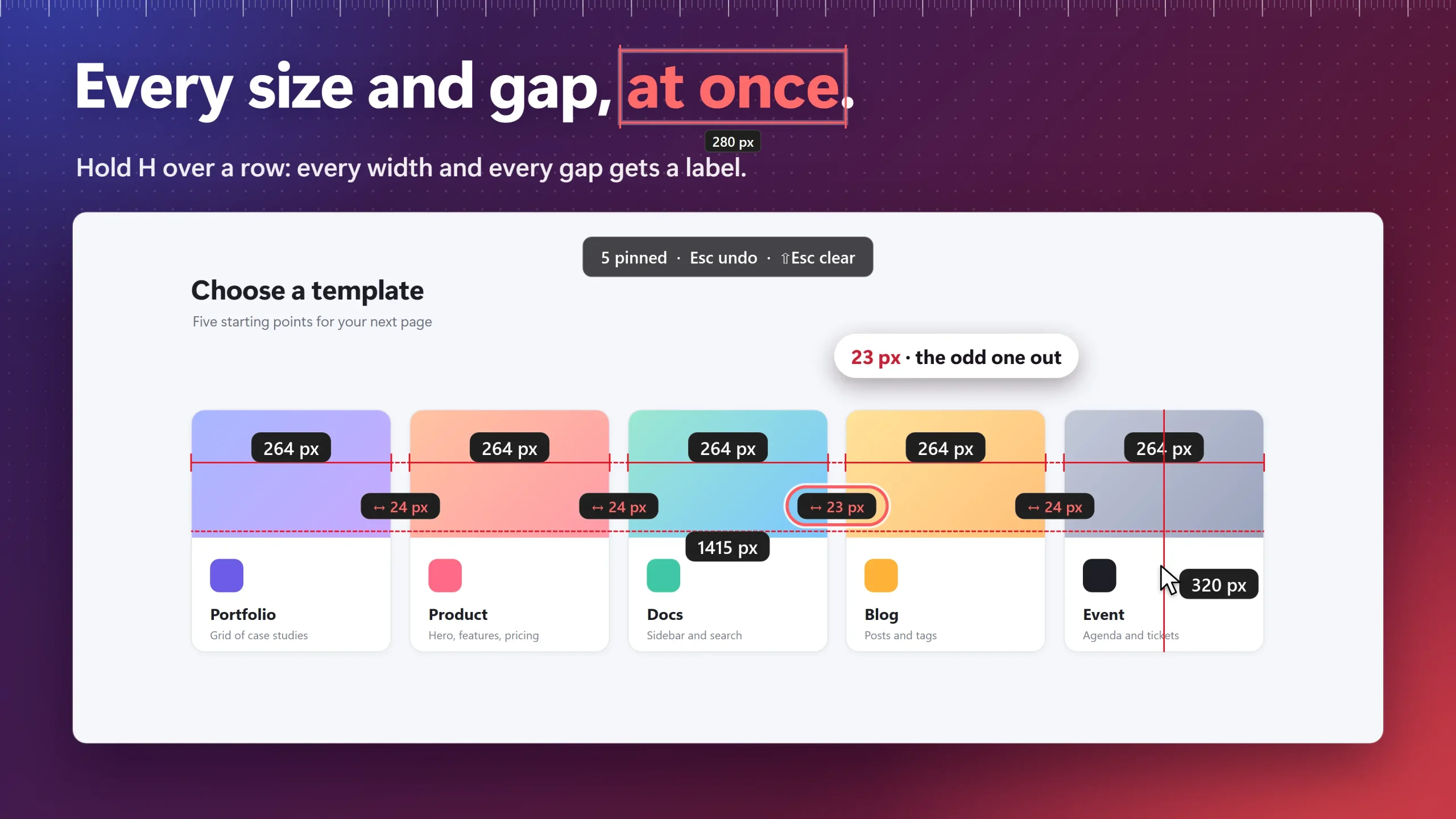
| Measure several objects at once | Press H on each element in a row (V for a column): every width, every gap and the total | Free |
| Snappable guides | Hold G to place guides | Free |
| Tolerance mode for shadows | T cycles edge tolerance: Low, Medium, High | Free |
| Crosshair mode | Hold Shift for full-screen crosshairs | Free |
| Copy to clipboard | C copies “320 px x 240 px”; Shift+C the width, Alt+C the height | Free |
| Screenshots of measurements | S takes a plain screenshot; screenshots with the measurements baked in come with the upgrade | Free / Pro |
How to Measure Like PixelSnap on Windows
- Install SIVA on the Microsoft Store and open the page or app you want to check.
- Press Ctrl+Shift+X. Hover any button, image or card to read its size.
- Drag a rough box around an element. When you let go, it snaps to the element’s edges. If a shadow or gradient throws the edge off, press T to change the tolerance.
- Click to pin the measurement. Hold G to drop a guide.
- For a row of cards, press H on each one (V for a column). SIVA labels every width, every gap and the total, so one gap that is 23 px instead of 24 px stands out.
- Press C to copy the size as text, or S for a screenshot. For a menu or tooltip that closes when you move the mouse, press F to freeze the frame SIVA measures.
Where SIVA Differs From PixelSnap
- Strength: snapping, pins, guides, gap labels, a colour picker (hold Ctrl for an 11×11 loupe, Ctrl+C copies Hex, RGB, HSL or Vec4) and plain screenshots are free forever.
- Strength: per-monitor DPI, multi-monitor and portrait screens. Units are px, in, cm and mm; the physical units are estimated from the DPI your screen reports.
- Limit: the row labels need one key press per element; nothing detects the whole row for you.
- Limit: screenshots with the measurements drawn in are part of the upgrade, while PixelSnap includes them in its price.
- Limit: no Figma, Sketch or CleanShot integrations, and no contrast checker.
Snap, pin and label every gap, without a Mac
Drag roughly and SIVA finds the element’s edges. Press H across a row and every width and gap gets a label. Works over any app, offline.
Free vs Pro: Measuring is free forever: snapping, pins, guides, rails, freeze, colour picker and plain screenshots. All Pro tools are free for 14 days from first launch, then Pro is a one-time $9.99 (US).
EpicRuler: The Paid Option for Mac and Windows
EpicRuler is the one PixelSnap-style ruler that sells a Windows build. It measures distance, dimension and position, snaps to edges, keeps snappable guidelines on screen until you remove them, and adds a colour picker with a click-and-drag contrast checker. A licence is $29 one-time for one device, with a 30-day money-back guarantee (EpicRuler pricing).
- Strength: one tool on both a Mac and a Windows PC, and a contrast checker that SIVA and PixelSnap don’t have.
- Strength: screenshots of your measurements with comments are included in the price.
- Limit: licences are per device, so a Mac plus a PC means two.
- Limit: the site lists Windows 10, and the latest entry in its public changelog is v1.1.3 from April 8, 2022. Use the 30-day refund window to test it on your Windows 11 setup.
- Limit: there is no free tier; you pay before you measure.
Microsoft PowerToys: Free, but Measure-and-Dismiss
If you already run PowerToys, its Screen Ruler is a free first try. Press Win+Ctrl+Shift+M and pick Bounds, Spacing, Horizontal or Vertical (Ctrl+1 to 4). It detects edges, and a pixel tolerance from 0 to 255 in Settings makes it more forgiving with gradients and shadows. A click copies the measurement to the clipboard (Microsoft Learn).
- Strength: free, from Microsoft, and it can show inches, centimetres, millimetres or display-independent pixels next to the pixel value.
- Limit: it is built for one check at a time. Holding Shift keeps bounds boxes only until you cancel, there are no guides, and nothing labels a whole row of gaps.
- Limit: no screenshots, and no copy as CSS or Tailwind. The colour picker is a separate PowerToys tool.
Copy Measurements as CSS or Tailwind
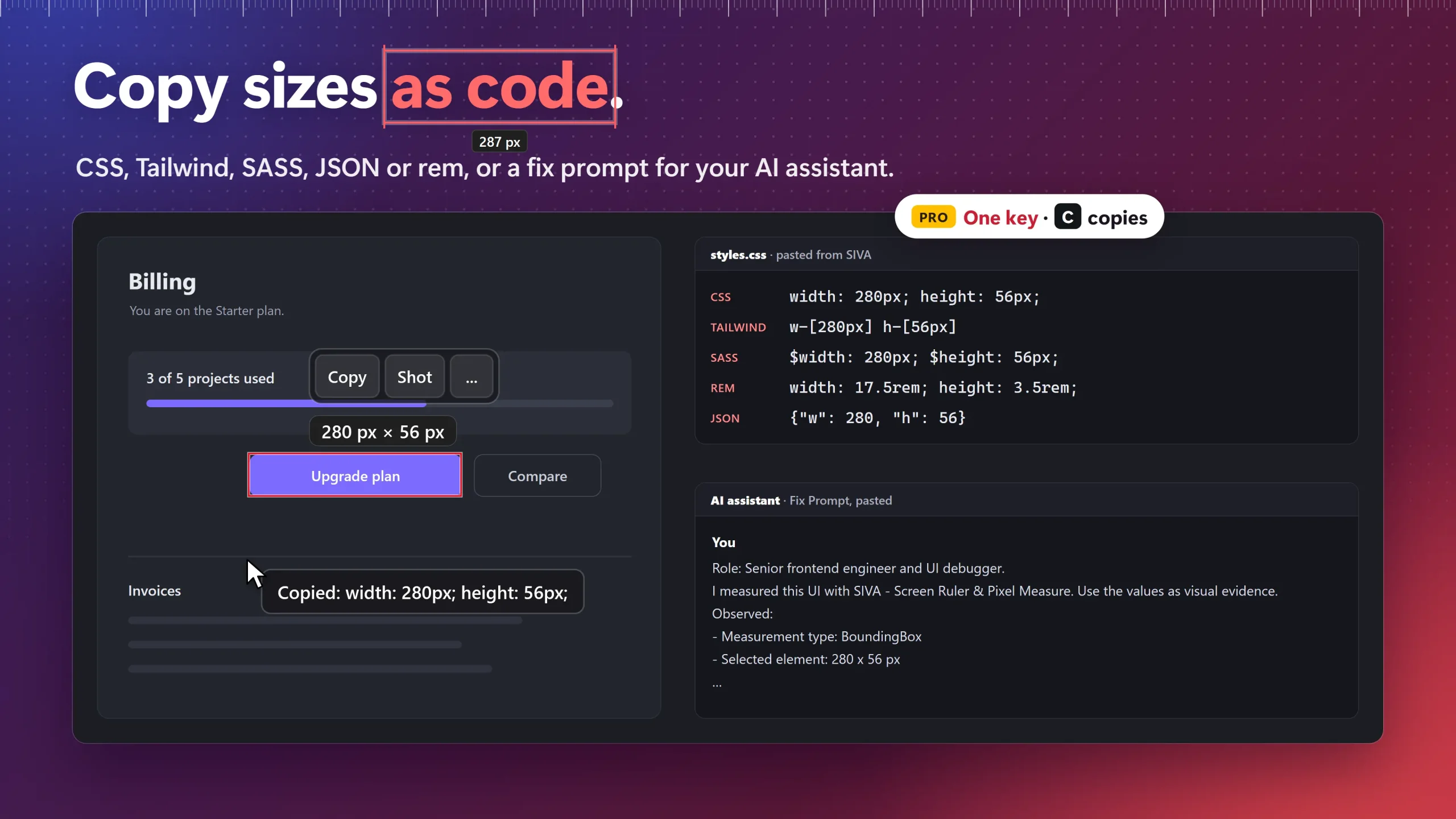
PixelSnap copies plain dimensions. If the measurement is going into code, SIVA can copy it as CSS, Tailwind, SASS, JSON or rem in one key, or as a ready-made fix prompt for an AI coding assistant. These code copies are included free for your first 14 days, then it’s a one-time upgrade. After that, C still copies the plain size.
Which PixelSnap Alternative Should You Choose?
- You moved from a Mac and want the same snap-and-pin habit for free: SIVA.
- You work on a Mac and a PC and want one tool on both: EpicRuler, $29 per device.
- You need one quick number and already have PowerToys: its Screen Ruler.
For the wider field, including floating rulers such as Bluegrams Screen Ruler and PicPick, see our comparison of the best screen rulers for Windows 11. For every SIVA shortcut and screenshot style, visit the SIVA screen ruler page.
When SIVA Is Not the Right Fit
- You check colour contrast as often as spacing. EpicRuler has a contrast checker; SIVA doesn’t.
- You need angles or point (pt) units. SIVA measures distance only, in px, in, cm or mm.
- Your work PC blocks the Microsoft Store. SIVA installs only from the Store, so ask your IT team first.
- You measure inside Sketch or Affinity on a Mac. PixelSnap’s integrations are made for that, and SIVA has no Mac version.
Frequently Asked Questions
Is there a PixelSnap for Windows?
No. PixelSnap 2 runs only on macOS, and its FAQ says there are no plans for a Windows version. On Windows, SIVA on the Microsoft Store (free) and EpicRuler ($29 per device) snap to element edges the same way. PowerToys has a free ruler with edge detection for one quick check at a time.
Is there an xScope for Windows?
No. xScope 4 (version 4.7.2) is macOS-only, and its trial needs macOS 12.3 or later. On Windows, SIVA covers its dimensions, rulers, guides and crosshair: hover to measure, drag to snap, hold G for guides and hold Shift for crosshairs.
Is SIVA free?
Yes. Measuring is free forever: snapping, pins, guides, rails, freeze, colour picker and plain screenshots. All Pro tools are free for 14 days from first launch, then Pro is a one-time $9.99 (US).
Does SIVA work on multiple monitors with different scaling?
Yes. SIVA puts one overlay on each monitor, follows each monitor’s DPI and handles portrait screens. It measures in pixels; inches, centimetres and millimetres are estimated from the DPI your screen reports.
Can I copy measurements as CSS or Tailwind on Windows?
SIVA copies the size as plain text for free (C gives “320 px x 240 px”). Copying as CSS, Tailwind, SASS, JSON or rem is included free for your first 14 days, then it is a one-time upgrade. EpicRuler copies width, height and colours; PowerToys copies the measured value when you click.
Measure any Windows screen the way you did on a Mac
Snapping, pins, guides, gap labels, a colour picker and plain screenshots, free forever. Every code copy is yours to try for 14 days.
Sources consulted: PixelSnap FAQ (Windows version); PixelSnap 2 changelog; xScope 4; EpicRuler pricing; EpicRuler changelog; Microsoft Learn: PowerToys Screen Ruler.
About the author: Mashyo is the founder of Creator Kit, the developer of SIVA. This guide lists what each competitor does better, so you can pick the tool that fits your desk rather than ours by default.
Last reviewed: