No. Textream needs macOS 15 or later and has no Windows build. The closest match on Windows is MIRAY: its Follow mode tracks your words offline and keeps your place, its Island sits under the webcam, and it stays hidden from screen share. Free for about 300 words a session. Get MIRAY on the Microsoft Store.
Creator Kit makes MIRAY.
Does Textream Run on Windows?
No. Textream is a free, open-source (MIT) teleprompter for Mac, with a companion for iPhone and iPad. The Mac app needs macOS 15 Sequoia or later, and its install instructions cover only macOS .dmg files and Homebrew. The GitHub page never mentions Windows.
If you searched and landed on a “Textream download for Windows” page, look at what it hands you. One such listing offers a file called Textreamv1.7.1sourcecode.zip, which is Swift source code for the Mac app, not a Windows program. There is no installer to run.
One partial workaround exists: Textream’s Remote Connection shows the teleprompter in a browser on another device over your local network, and its page says that includes Windows computers. But a Mac still has to run Textream, so it only helps if you own one.
What Textream Does and What Matches It on Windows
Textream’s main idea is a script that highlights each word as you say it, shown in a Dynamic Island-style overlay under the Mac’s camera cutout. Here is each part and the Windows feature that does the same job.
| Textream feature (Mac) | On Windows with MIRAY | Match |
|---|---|---|
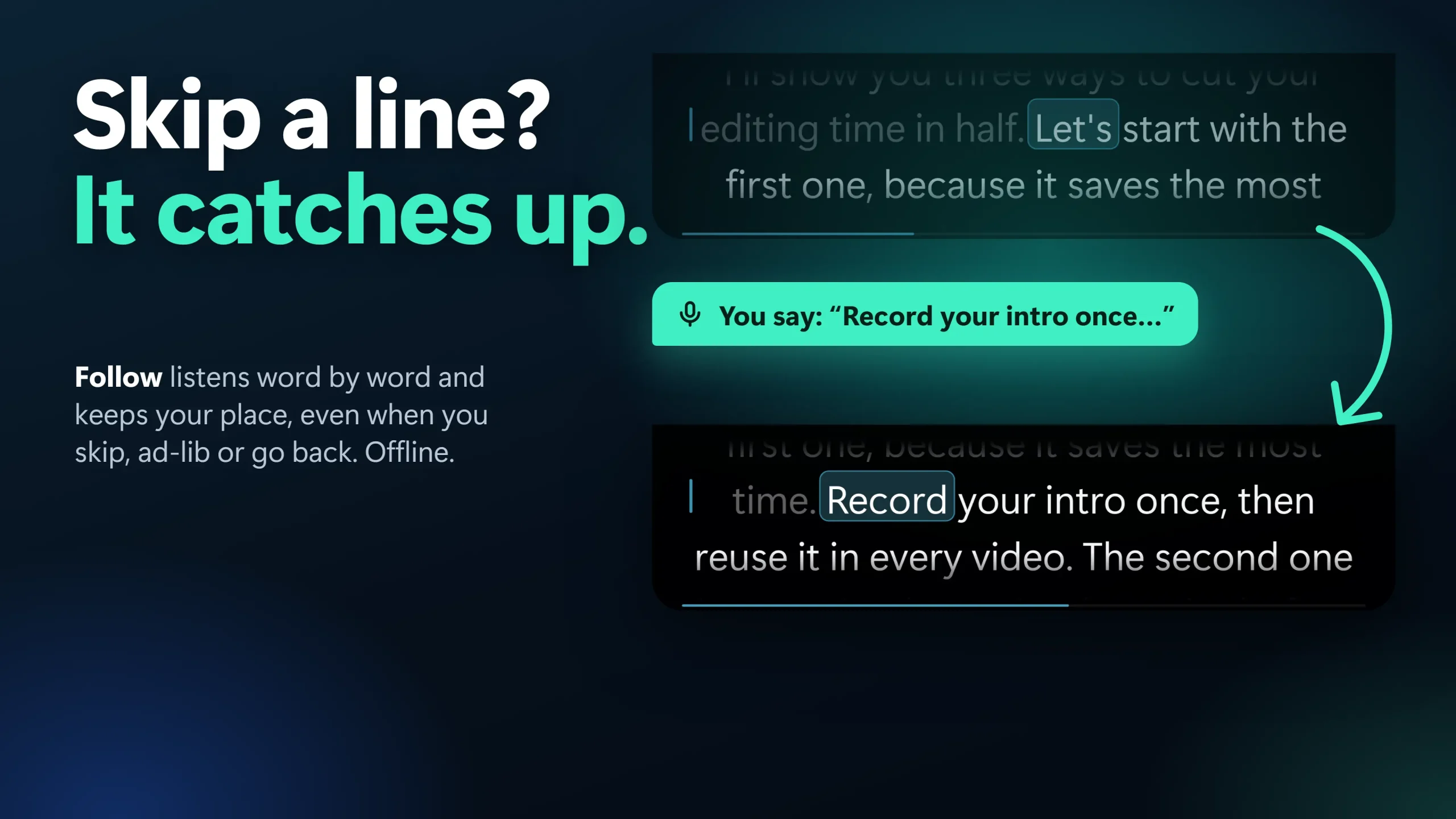
| Word Tracking: highlights each word as you say it | Follow: word-by-word tracking, offline, keeps your place when you skip or ad-libOur app | Close. Follow is English only |
| Voice-Activated: scrolls while you speak | Voice: scrolls while you talk, eases to a stop when you pause | Same idea, any spoken language |
| Classic: constant-speed scrolling | Classic: 60 to 300 words per minute | Same |
| Pinned to Notch: overlay under the camera cutout | Island: docked at the top of the screen under the webcam | Same place, no notch needed |
| Floating Window | Float (drag anywhere) and Ghost (see-through, click-through) | Same, plus click-through |
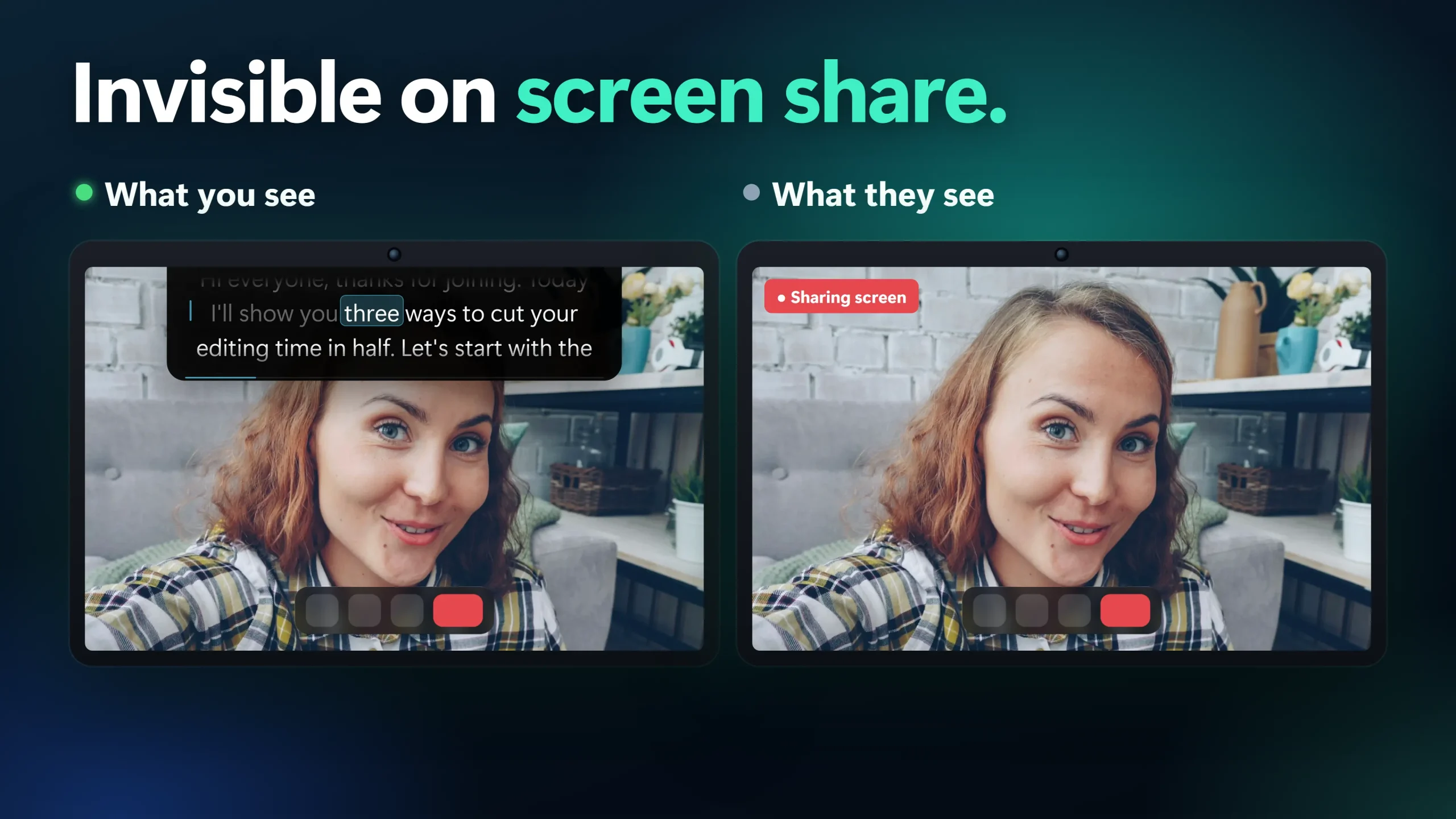
| Hide from screen share | On by default (Windows 10 version 2004 or later; not over Remote Desktop) | Same |
| Remote Connection, Director Mode, iPhone companion | Nothing equivalent | Not available |
| Price | Free (about 300 words a session; Follow 3 sessions a week) Pro $19.99 once (US price; local prices vary) | Textream is free with no limits |
1. MIRAY: Follow Mode Is the Closest Match
MIRAY is a Windows teleprompter that covers Textream’s three scrolling modes. Follow listens word by word with a speech model that ships inside the app and works offline, so it keeps your place when you skip a line, ad-lib or go back. Voice scrolls while you speak, and Classic scrolls at a fixed speed. The Island layout docks the script under your webcam, and the app is hidden from screen capture by default. It has no account.
Where it falls short: Follow understands English speech only (Voice works in any language), and on the free tier Follow runs 3 sessions a week on your own scripts. Free sessions stop at about 300 words (about 2 minutes at the default speed). MIRAY is Windows only and does not record video or audio.
Get Textream-style word tracking in four steps
- Install MIRAY from the Microsoft Store. It needs Windows 10 version 2004 or later.
- Press Ctrl+Alt+V to paste your script, or import a .txt, .md, .docx, .pptx (speaker notes) or .pdf file.
- Choose the Island layout to dock the script under your webcam. Ctrl+Alt+F switches between Island and Float.
- Choose Follow scrolling, then press Ctrl+Alt+Space to start and pause. Read aloud in English; the highlight moves with your words.
Want Island for a call or a webcam shot? The notch-style apps that run on Windows are compared in a separate guide, and voice-activated teleprompters explains the difference between pause-aware scrolling and word tracking.
A teleprompter that follows your words, on Windows
MIRAY’s Follow mode keeps your place as you speak, and its Island docks under the webcam, off the screen you share.
Free: Classic and Voice scrolling for about 300 words a session (about 2 minutes), one script of your own, Island, Float and Ghost, hidden from screen share, every import format, and Follow 3 sessions a week. Pro is a one-time $19.99 (US price; local prices vary), no subscription: unlimited length, unlimited scripts, Follow every time.
2. Flow Teleprompter: Free and Open Source Like Textream
Flow Teleprompter is the nearest Windows match to Textream’s open-source spirit: a GPL-3.0 app for Windows 10 and 11, available from the Microsoft Store or as an .exe or .msi from GitHub. It is an always-on-top overlay with capture-protection options and local voice tracking that uses Vosk speech models. English is bundled and seven more languages can be downloaded. AlternativeTo lists a free version with limited features and a one-time paid tier of up to $5.
Where it falls short: it is a free-form overlay, not an Island docked under the camera, and its GitHub page does not say what the free and paid tiers include or which screen-share tools its capture protection covers. Test that part yourself (see below).
3. Notch: Follows Your Script in Seven Languages
Notch has a Windows build and, on Windows, sits at the top centre of the screen (per AlternativeTo). The teleprompter alone costs $14.99 once, up to 2 devices, with a 7-day trial. Its page says speech recognition runs on your computer and lists English, German, Spanish, French, Italian, Portuguese and Arabic. A GitHub release for Windows x64 (version 2.0.0, 16 November 2026) carries the installer.
Where it falls short: Notch 2.0 is a larger product than a prompter, with a workspace that records calls, and the Windows installer is about 194 MB. Its own page says hiding from screen sharing depends on your system and capture method, so check a test share first. It is not free after the trial.
What You Lose Moving From Textream
- No usage limits. Textream is free with no caps. MIRAY’s free tier stops each session at about 300 words and Follow at 3 sessions a week. Pro is a one-time purchase; Flow is the free pick if you do not want a limit.
- Remote Connection and Director Mode. Another person writing and pushing your script from a browser has no MIRAY equivalent.
- The iPhone and iPad companion. MIRAY runs on Windows only.
When MIRAY Is Not the Right Fit
- You also own a Mac. Textream is free there, with no session limit. Use it on the Mac and MIRAY on the PC.
- You speak a language other than English and want word tracking. MIRAY’s Follow is English only. Voice scrolling works in any language; Notch and Flow list more languages for tracking.
- You want to record in the same app. MIRAY does not record video or audio. Pair it with the Camera app, OBS or your meeting tool.
- You present over Remote Desktop. MIRAY falls back to visible there and tells you once.
Test It in 60 Seconds Before Your Next Call
Every app above says it can hide from screen share. Check it yourself; it takes a minute and works for all three.
- Start a test meeting alone in Teams, Zoom or Meet.
- Open your teleprompter app and start the script.
- Share your entire screen, not one window.
- Look at the preview of your shared screen. The prompter should not be in it.
MIRAY needs Windows 10 version 2004 or later, and it is not hidden over Remote Desktop. Use any teleprompter for your own notes and presentations, not for exams, tests or proctored sessions.
Still choosing? The best teleprompter apps for Windows guide compares more of them, and the MIRAY page lists every feature. To use the same setup on a laptop, see how to turn your laptop into a teleprompter.
Frequently Asked Questions
Is there a Textream for Windows?
No. Textream runs on macOS 15 or later, with an iPhone and iPad companion. Its GitHub page does not mention Windows, and the Windows download listings point to the Swift source code, not a Windows installer. On Windows, MIRAY is the closest match for word tracking and an Island under the webcam.
What is the best free Textream alternative for Windows?
MIRAY is free for about 300 words a session, with Follow word tracking for 3 sessions a week, and Flow Teleprompter is a free open-source overlay with limited features. Neither is limitless like Textream, so pick by whether you want an Island under the webcam (MIRAY) or a plain overlay (Flow).
Is MIRAY free?
Yes. Free: Classic and Voice scrolling for about 300 words a session (about 2 minutes), one script of your own, Island, Float and Ghost, hidden from screen share, every import format, and Follow 3 sessions a week. Pro is a one-time $19.99 (US price; local prices vary), no subscription: unlimited length, unlimited scripts, Follow every time.
Does MIRAY’s Follow work in languages other than English?
No. Follow understands English speech only. Voice scrolling, which scrolls while you speak and stops when you pause, works in any spoken language.
None of these worked. What now?
If the test shows the prompter in your share, check that you run Windows 10 version 2004 or later and are not on Remote Desktop. If Follow loses your place, speak in English and check the microphone, or switch to Voice scrolling. If the free session limit is the problem, Flow Teleprompter is free with limits, and MIRAY Pro is a one-time purchase.
Word-by-word teleprompting for your Windows PC
Keep your place when you ad-lib, read under the webcam and keep the script off the shared screen. Free for about 300 words a session.
Sources consulted (17 November 2026): Textream on GitHub and its wiki; Textream releases; onworks Textream listing; Flow Teleprompter on GitHub; AlternativeTo: Flow Teleprompter; trynotch.net; AlternativeTo: Notch Teleprompter; Notch releases on GitHub.
About the author: Mashyo is the founder of Creator Kit, the developer of MIRAY. This guide says plainly that Textream is Mac-only and lists what you give up on Windows, so you can pick the right app.
Last reviewed: