We tested 4 screen rulers for Windows 11 in 2026. SIVA (Free) is the outstanding pick, combining smart auto-snap edge detection and a color picker with developer-friendly code export (CSS, Tailwind, SASS) and screenshot beautification via an optional Pro upgrade. It installs securely from the Microsoft Store and runs 100% offline. PowerToys Screen Ruler is the best no-frills tool for quick, instant measurements but lacks export, screenshots, and persistent guide lines.
| Rank | Tool | Price | Edge Detection | Screenshot | Color Picker | CSS Export | Store Install | Overall |
|---|---|---|---|---|---|---|---|---|
| #1 | SIVATop Pick | Free (Pro avail.) | Auto-snap | Beautify | HEX/RGB/HSL | CSS/TW | Microsoft Store | |
| #2 | PowerToys Screen Ruler | Free | Basic | separate tool | Microsoft Store | |||
| #3 | Screen Ruler (Bluegrams) | Free | ||||||
| #4 | PicPick | Free / $24–55 | Basic | RGB/HTML |
What Makes a Great Screen Ruler in 2026?
A great screen ruler does more than draw a line on your screen. In 2026, with 4K displays, multi-monitor workflows, and design systems built around 8px grids as the norm, the ideal screen ruler must meet five requirements:
- Smart edge detection — The ruler should automatically detect and snap to UI element boundaries, not require manual pixel alignment
- Multi-feature integration — Measurement, screenshot capture, and color picking should work together in one app
- Developer export — Measurements should copy directly as CSS, Tailwind, SASS, or JSON — not just raw pixel numbers
- Multi-monitor DPI awareness — Correct measurements across screens with different scaling (100%, 125%, 150%, 200%)
- Performance — The overlay must render at 60 FPS with zero system impact, using GPU acceleration (DirectX 11 or later)
#1: SIVA — The Smart Measurement Standard (Free)
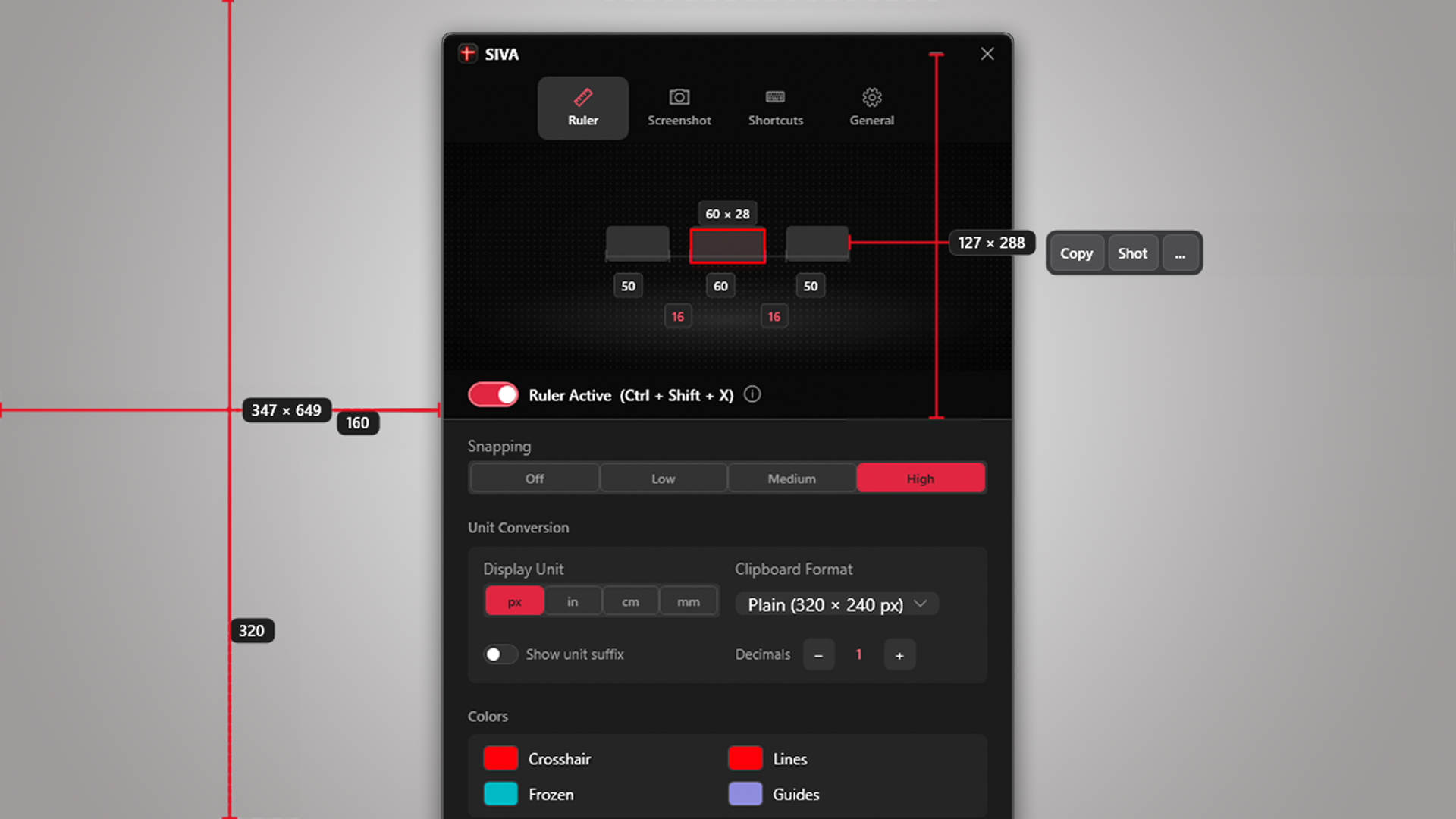
SIVA is a free Windows screen measurement utility by Creator Kit that bundles a smart screen ruler with edge detection and a color picker, with professional screenshot presets available through an optional Pro upgrade. It is available from the Microsoft Store and runs 100% locally on .NET 8 with DirectX 11 rendering and zero telemetry.
How Does SIVA’s Screen Ruler Work?
SIVA’s Smart Screen Ruler uses intelligent edge detection to automatically snap to UI element boundaries. Hold Left-click and hover near any button, image, text block, or container – SIVA instantly identifies the element edges and displays its width and height in pixels. Drag across a section and the ruler shrinks to wrap the exact bounding box of whatever is underneath.
The measurement system includes magnetic guide lines that snap to content automatically, a tape measure mode for point-to-point distances, and multi-point path measurements that export as SVG. You can nudge selections with arrow keys for sub-pixel precision, hold dimensions with pinned measurements that include resize handles, and view gap detection between elements.
What Formats Can SIVA Export Measurements In?
SIVA copies measurements as plain text for free. With SIVA Pro, it can also export CSS (width: 240px; height: 48px;), Tailwind classes, SASS variables, JSON objects, and REM units with one click, eliminating the manual step of converting pixel values into code-ready snippets.
Does SIVA Also Take Screenshots?
Yes. Basic screenshot capture is included for free. With SIVA Pro, Studio Capture can wrap screenshots in professional preset backgrounds such as Aurora (gradient blue), Midnight (dark), and Sunset (warm), automatically adding rounded corners, soft shadows, polished frames, and customizable auto-save file naming. This lets you measure an element, capture it, and pick its color without switching tools.
Version: 1.2 (last updated ). Size: 197.9 MB. Compatibility: Windows 10 and 11. Rendering: DirectX 11 at 60 FPS.
Key takeaway: SIVA combines free smart screen measurement and color picking with optional Pro code export and screenshot styling in one Microsoft Store app.
#2: PowerToys Screen Ruler — Best Free No-Frills Option (With Limitations)
PowerToys Screen Ruler is Microsoft’s free, open-source measurement utility activated with its configured shortcut — currently Win+Ctrl+Shift+M by default. It offers four measurement modes: bounding box, spacing between elements, horizontal distance, and vertical distance. It’s maintained by 600+ contributors and installs from the Microsoft Store as part of the PowerToys suite.
Why Isn’t PowerToys Screen Ruler Ranked #1?
PowerToys Screen Ruler is a “measure and dismiss” tool — it activates on demand, you take your measurement, and the overlay disappears. There are no persistent measurements, no guide lines, and no way to export values as CSS, Tailwind, or any developer format. It also has no screenshot capability, no color picker integration (that’s a separate PowerToys tool with a different shortcut), and no beautification presets.
Edge detection exists but is less precise than SIVA’s auto-snap engine on complex layouts with nested elements.
Best for: Quick one-off measurements when you already have PowerToys installed.
Key takeaway: PowerToys Screen Ruler is excellent for free, quick measurements, but it lacks persistent pinned measurements, guide lines, integrated screenshots, and developer-format export.
#3: Screen Ruler by Bluegrams — Simple and Portable
Screen Ruler is a free, open-source ruler that floats on your desktop as a resizable horizontal or vertical bar. You position it manually over elements to read pixel measurements from the ruler markings — similar to holding a physical ruler against your screen. It supports pixels, centimeters, inches, points, and percentage units. It’s portable (no installation required) and licensed under BSD-3.
Limitations: No edge detection — you must align the ruler manually. No color picker. No CSS export. No DirectX overlay. No guide lines. No measurement labels. Not on the Microsoft Store. The paradigm is fundamentally different from smart measurement tools: Screen Ruler is a digital tape measure that you move by hand.
Key takeaway: Screen Ruler is the simplest free option — a portable ruler you drag around the screen. No intelligence, no export, no screenshots.
#4: PicPick — All-in-One With a Dated UI
PicPick is an all-in-one screenshot and design utility that includes a pixel ruler, screen protractor, crosshair, color picker, magnifier, whiteboard, and image editor. The ruler mode displays a resizable ruler bar with pixel markings. PicPick is free for personal/home use but requires a commercial license ($24–$55) for business use.
Limitations: The ruler is a basic bar overlay — no edge detection, no auto-snap, no smart bounding. No CSS/Tailwind/SASS export. The screenshot tool captures raw images with no beautification presets. The image editor uses a Paint-style interface that feels dated compared to modern Windows 11 apps. Requires a manual exe download (not on the Microsoft Store).
Best for: Users who need a free personal-use screenshot tool with a basic ruler attached. Not suitable for professional developer workflows requiring CSS export or precise edge detection.
What About Mac Screen Rulers?
If you’re comparing Windows options against Mac measurement tools, here’s the current pricing landscape on macOS:
| Mac Tool | Current Price (April 2026) | Windows Equivalent |
|---|---|---|
| PixelSnap 2 | $39.00 (direct license) | SIVA (Free) |
| xScope 4 | $49.99 (direct license) | SIVA (Free) |
| CleanShot X (with beautify) | $29.00 (one-time) | SIVA (Free) |
On Mac, getting smart screen measurement plus screenshot beautification requires two apps — PixelSnap ($39) + CleanShot X ($29) — totaling $68. SIVA provides free smart screen measurement on Windows, with screenshot beautification available through an optional Pro upgrade.
The Bottom Line
For a free, quick, one-off measurement on Windows, PowerToys Screen Ruler is an excellent no-frills choice — activate it with its configured shortcut, measure, done. For anyone who designs interfaces, writes CSS, tests layouts, or creates documentation professionally, SIVA offers the stronger free workflow: smart edge detection with auto-snap, persistent measurements, guide lines, color picking, and basic screenshot capture, with developer-ready CSS/Tailwind/SASS export and preset screenshot styling available through SIVA Pro. It brings these tools together in one lightweight Microsoft Store app with DirectX 11 rendering, making it one of the highest-value Windows screen measurement workflows in 2026.
Measure screens and capture beautiful mockups with SIVA
Enjoy pixel-perfect auto-snap edge detection, color picking, guide lines, and one-click CSS/Tailwind export, alongside gorgeous styled screenshot frames.
Frequently Asked Questions
What is the best screen ruler for Windows 11?
SIVA is the best screen ruler for Windows 11 in 2026. It combines free smart edge detection and color picking with optional Pro code export and screenshot beautification, and is available from the Microsoft Store. PowerToys Screen Ruler is the best no-frills alternative for quick measurements.
Is there a free screen ruler for Windows?
Yes. PowerToys Screen Ruler (free, by Microsoft) is a free no-frills option — activate it with its configured shortcut to measure bounding boxes and spacing. Screen Ruler by Bluegrams is a free portable ruler. Neither includes integrated screenshots, developer-format export, or persistent measurements.
Can a screen ruler export measurements as CSS or Tailwind?
With SIVA Pro, you can export measurements directly as CSS, Tailwind classes, SASS variables, JSON objects, and REM units. Other tools (PowerToys, Screen Ruler, PicPick) only display raw pixel numbers that you must manually convert.
What is the difference between a screen ruler and a pixel ruler?
A screen ruler measures distances and dimensions on your display — it can work in pixels, inches, centimeters, or other units. A pixel ruler specifically measures in pixel units. SIVA supports both: its Smart Screen Ruler measures in pixels by default but can also display measurements in inches, centimeters, millimeters, and feet via its real-world units mode.
How much does a screen ruler for Windows cost?
Free options exist (PowerToys, Screen Ruler by Bluegrams) but are limited to basic measurement without CSS export or screenshots. SIVA is free from the Microsoft Store and includes smart edge detection, CSS export (Pro), screenshot beautification (Pro), and color picking. PicPick is free for personal use but requires a $24–$55 commercial license. Mac equivalents are significantly more expensive: PixelSnap ($39) and xScope ($49.99).
About the Author
Mashyo is the founder of Creator Kit, a studio building professional design and presentation tools for Windows. SIVA is Creator Kit’s screen measurement utility. For media inquiries or collaboration: support@creatorkit.mashyo.com
Last updated: . All prices and features verified against official product pages, app store listings, and GitHub repositories.