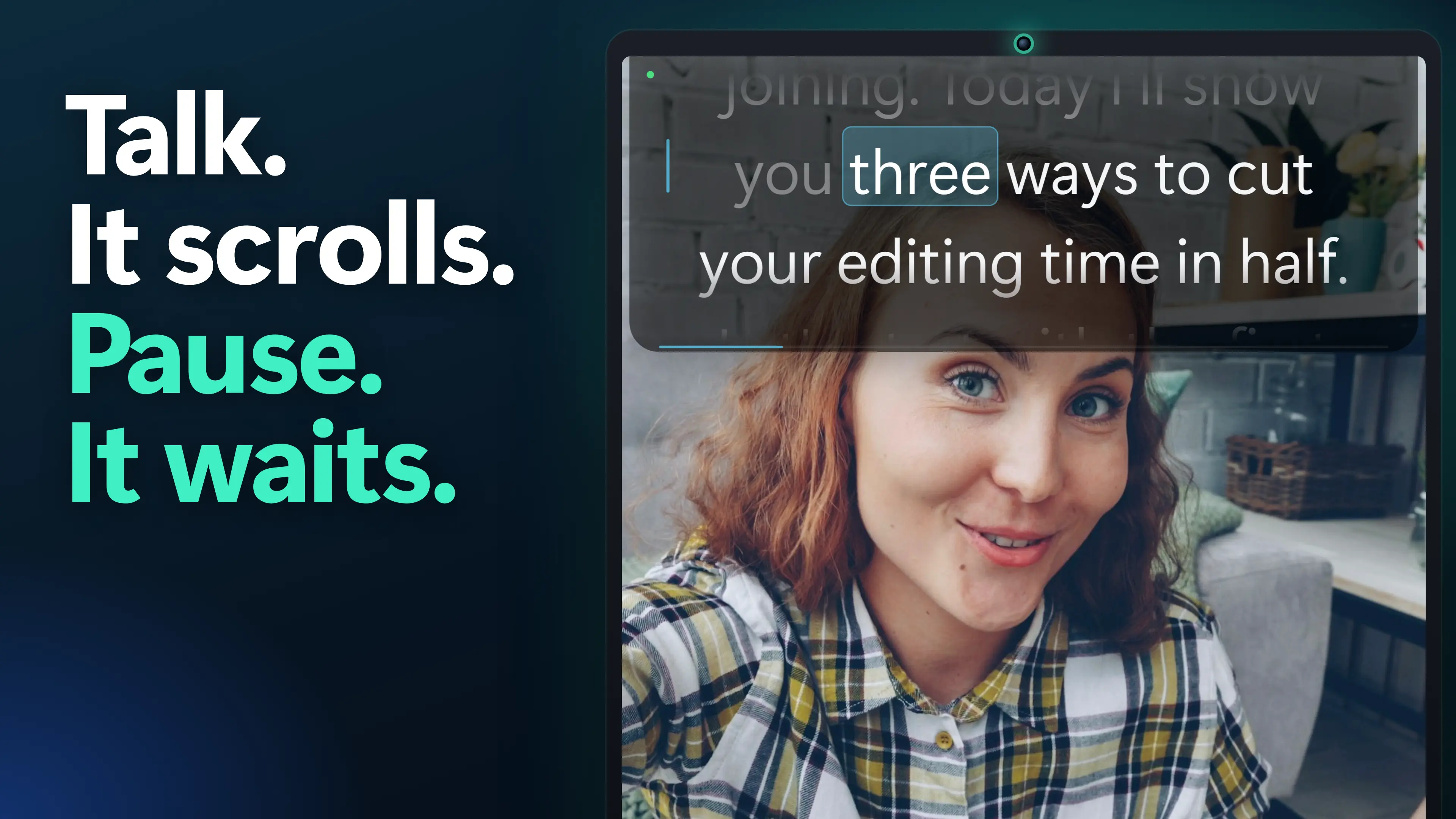
A voice-activated teleprompter scrolls while you speak and waits when you pause. On Windows, MIRAY on the Microsoft Store (our app) is free for about 300 words a session: Voice works in any language, and Follow tracks your words in English, 3 sessions a week. Follow every time is a one-time $19.99.
Creator Kit makes MIRAY. Competitor facts checked 2026-11-17 on their official pages.
The Two Kinds of Voice-Activated Teleprompter
Search “voice activated teleprompter” and the first page is mostly iPhone and iPad listings. Every one of them says it “follows your voice”, but two different things hide behind that phrase, and the difference decides which app suits you.
- Pause-aware scrolling listens for speech, not for words. While you talk, the script moves at your set pace; when you stop, it stops. It works in any language and with any accent, because it never tries to understand you. It does not know where you are in the text: if you skip a paragraph or ad-lib for a minute, it keeps scrolling.
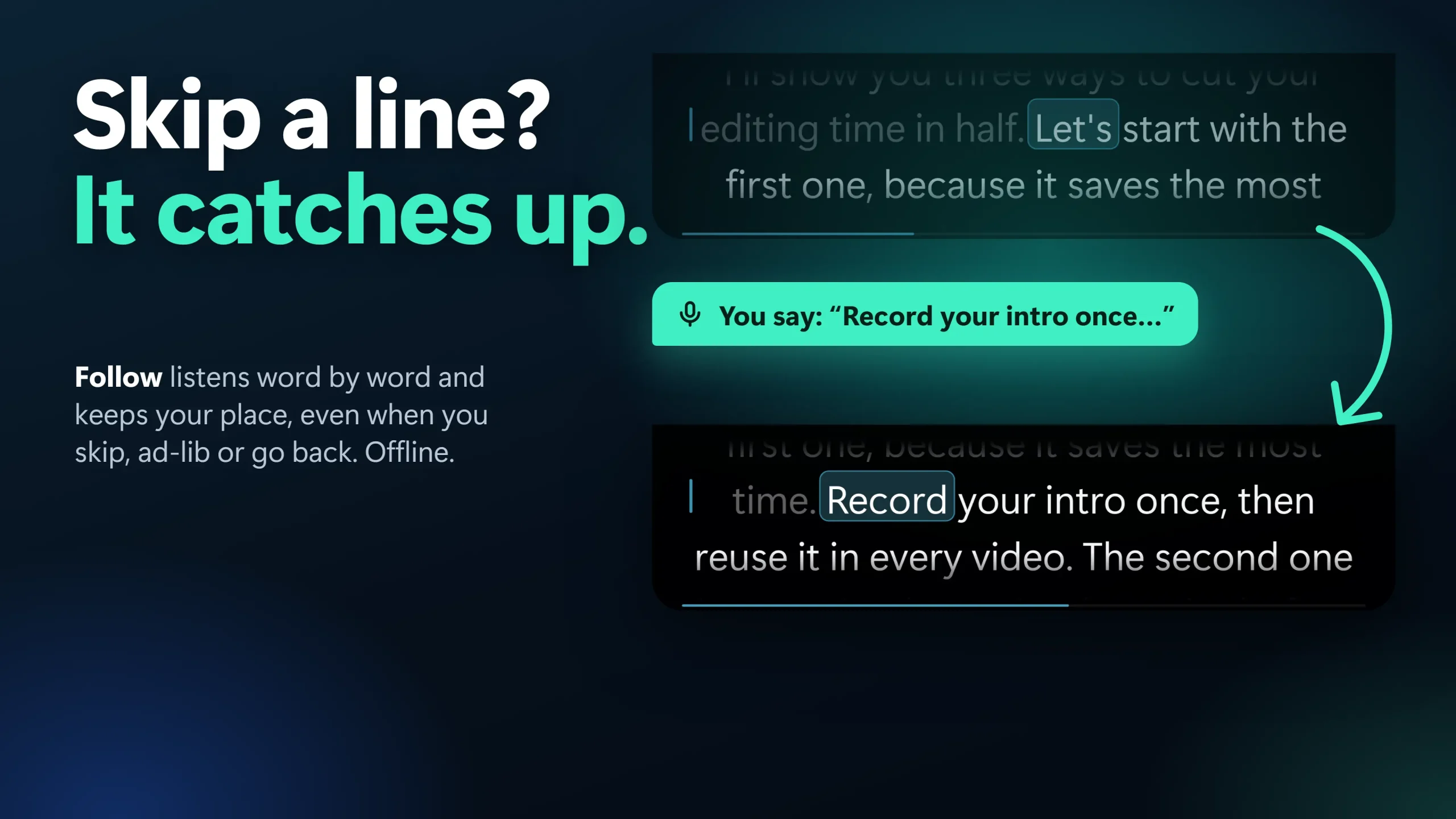
- Word tracking runs speech recognition and matches what you say to the script. It keeps your line at the reading point, waits while you go off-script, and catches up when you skip ahead. It only works in the languages its speech model knows.
Pause-aware scrolling is the simple fix for the most common complaint about prompters, a scroll that runs too fast or too slow for you. Word tracking is the fix for losing your place. MIRAY has both as separate modes: Voice (pause-aware, any language) and Follow (word tracking, English).
Voice-Activated Teleprompters for Windows: Free Limits Compared
Six options scroll by voice on a Windows PC, either as a Windows app or in a browser. The table shows how each one’s official page describes its voice feature on 2026-11-17, the languages it names and its real free limit.
| App | On Windows | Voice kind | Languages | Real free limit | Free / Paid |
|---|---|---|---|---|---|
| MIRAYOur app | Windows 10 (2004+) and 11 app | Both: Voice (pause-aware) and Follow (word tracking) | Voice: any. Follow: English | About 300 words a session; Follow 3 sessions a week; one script of your own | Free (Pro $19.99 one-time, US price; local prices vary) |
| Elgato Virtual Prompter | Windows 11 only, in Elgato Studio 2.0+ | Voice Sync: follows your place, keeps up if you skip a line | Not stated | Docked mode with Voice Sync, no time limit; Floating is paid | Free (Pro $2.99/mo, $29.90/yr or $49.99 lifetime) |
| Flow Teleprompter | Windows 10 and 11 app (Microsoft Store, GitHub) | Word tracking with local Vosk speech models | English bundled; 7 more to download | Not stated on its GitHub page | Open source (GPL-3.0); free and paid tiers on its roadmap |
| Speakflow | Browser (Windows app not confirmed on its pricing page) | Flow: advances as you speak, waits when you pause | Not stated | 10 minutes of Flow a month | Plus $15/mo, Studio $99/mo (billed yearly) |
| Teleprompter.com | Web app (Windows not listed) | VoiceGlide: tracks the spoken word, waits when you go off-script | 28 languages | Voice scrolling on the free Starter plan; exports watermarked | Pro $19.99/mo or $7.50/mo billed yearly |
| PromptSmart | “PC” listed (Windows not named) | VoiceTrack: stops when you improvise, resumes on the script | English, Spanish, French, Russian, German | 7-day free trial | Subscription (prices not on its page) |
The highlighted row is our app. “Voice kind” uses each vendor’s own description; where a page does not name the languages, we say so rather than guess. Prices are in USD as shown on each page.
1. MIRAY: Both Kinds of Voice Scrolling, Free on Windows
MIRAY is the teleprompter we make, and “Voice-Activated Teleprompter” is in its Store name. Voice mode uses a voice-activity model: it scrolls while you talk and eases to a stop when you pause, in any language. Follow mode runs an offline speech model that tracks you word by word in English, so it keeps your place when you skip, ad-lib or go back. Both run on your PC; audio is analysed in memory and never recorded, stored or uploaded.
The prompter docks under your webcam (Island), floats anywhere (Float) or turns see-through and click-through (Ghost), and it is hidden from screen sharing and recordings by default. If you prefer a fixed speed, Classic mode runs from 60 to 300 words per minute.
| Pros | Cons |
|---|---|
Pause-aware Voice and word-tracking Follow in one app, both on Free Voice works in any spoken language Offline, no account; your audio is never stored Hidden from screen share by default; Island, Float and Ghost are free Runs on Windows 10 (2004+) as well as Windows 11 | Follow understands English speech only Free sessions stop at about 300 words (about 2 minutes); Follow 3 sessions a week on Free Windows only, and not hidden over Remote Desktop It does not record video or audio; pair it with the Camera app, OBS or Clipchamp |
Speak, and the script keeps up
Voice scrolls while you talk and waits when you pause. Follow keeps your place word by word.
Free vs Pro: Free: Classic and Voice scrolling for about 300 words a session (about 2 minutes), one script of your own, Island, Float and Ghost, hidden from screen share, every import format, and Follow 3 sessions a week. Pro is a one-time $19.99 (US price; local prices vary), no subscription: unlimited length, unlimited scripts, Follow every time.
How to Turn On Voice Scrolling in MIRAY
- Install MIRAY from the Microsoft Store and open it (Ctrl+Alt+D opens it later).
- Paste your script (Ctrl+Alt+V) or import a .docx, .pdf, .txt, .md or PowerPoint speaker notes.
- In the mode switch, pick Voice (any language) or Follow (English word tracking).
- Open Settings › Voice & Follow, choose your Microphone, and say something to check the Input level.
- Press Ctrl+Alt+Space to start, then just talk.
If the script moves when nobody is talking, lower Voice sensitivity so it ignores background noise; if it stalls when you speak softly, raise it. If Windows blocks the microphone for desktop apps, MIRAY tells you and falls back to Classic: turn it on in Windows Settings › Privacy & security › Microphone.
Test It in 60 Seconds: Is the Prompter Hidden on Your Call?
- Start a meeting alone in Zoom, Teams or Meet.
- Click Share screen and pick your entire screen, not one window.
- Start the MIRAY script with Ctrl+Alt+Space and look at the share preview, or record the meeting and play it back. You see the script; the preview does not.
This needs Windows 10 version 2004 or later and does not hold over Remote Desktop, where MIRAY becomes visible and tells you once. Our guide to an invisible teleprompter for screen sharing explains how it works.
2. Elgato Virtual Prompter: Free Voice Sync on Windows 11
Elgato Virtual Prompter is part of Elgato Studio 2.0 and later. Its Voice Sync listens through your microphone, scrolls as you speak, pauses when you pause, keeps up if you skip a line and recovers when you go off-script, which is word-tracking behaviour. Docked mode, a strip under your camera, is free with no time limit and includes Voice Sync. Floating mode needs Virtual Prompter Pro: $2.99 a month, $29.90 a year or $49.99 lifetime. It needs Windows 11 (64-bit or ARM64), and its page names no languages.
| Pros | Cons |
|---|---|
Voice Sync free in Docked mode, no time limit Keeps up when you skip a line Lifetime option for the paid mode | Windows 11 only; needs Elgato Studio Supported languages not stated No hidden-from-screen-share option on its page |
3. Flow Teleprompter: Open-Source Voice Tracking for Windows
Flow Teleprompter is a Windows 10 and 11 app under GPL-3.0, version 2.0.0, from the Microsoft Store or GitHub. Its voice tracking runs locally with Vosk speech models: English comes bundled, and Turkish, Arabic, German, French, Spanish, Portuguese and Finnish can be downloaded. It is an always-on-top overlay with click-through and capture-protection options. Its GitHub page shows no prices, and its roadmap mentions a free and paid tier split, so check the Store listing for the current terms.
| Pros | Cons |
|---|---|
Word tracking in eight languages Open source, runs locally Overlay with click-through and capture protection | Extra languages are separate downloads Free limits not stated on its GitHub page No pause-aware mode listed for unsupported languages |
4. Speakflow: Pause-Aware Flow in the Browser
Speakflow describes Flow as a script that “advances as you speak and waits when you pause”. The Free plan includes 10 minutes of Flow a month; Plus ($15 a month) and Studio ($99 a month), both billed yearly, have unlimited Flow, and a one-time Plus Pass covers 7, 30 or 90 days. Its Overlay works over Zoom, Meet and Teams. The pricing page names iOS and Android apps but does not confirm a Windows desktop app, and names no Flow languages.
| Pros | Cons |
|---|---|
Nothing to install Short-term passes instead of a subscription Overlay for video calls | Only 10 minutes of Flow a month free Unlimited Flow is a subscription Windows desktop app not confirmed on its pricing page |
5. Teleprompter.com: VoiceGlide in 28 Languages (Web on Windows)
Teleprompter.com calls its voice scrolling VoiceGlide. It runs on-device speech recognition, tracks the spoken word (it can snap that word to the top of the screen), waits when you go off-script and resumes when you return. It names 28 languages, right-to-left scripts included. Voice scrolling is on the free Starter plan, whose video exports carry a watermark. The page lists iOS, Android, macOS and Web, not Windows, and states offline use only for iOS, Android and macOS, so on a PC you use it in the browser.
| Pros | Cons |
|---|---|
The widest language list we found (28) Voice scrolling on the free plan One account across phone, Mac and web | No Windows app; web only on a PC Free exports are watermarked Paid plans are subscriptions |
6. PromptSmart: The Original VoiceTrack
PromptSmart markets VoiceTrack as patented: it scrolls as you speak, stops when you pause or improvise and resumes when you return to the script. Recognition runs on the device without internet, in English, Spanish, French, Russian and German. It offers a 7-day trial and lists web, mobile and “PC”, but the page we read names neither Windows nor prices. Our guide to PromptSmart alternatives for Windows compares the options without a subscription.
| Pros | Cons |
|---|---|
Word tracking in five languages Works offline Remote-control sessions for teams | Subscription after a 7-day trial Windows and prices not named on its page Built around phones and tablets first |
Voice Scrolling Tips That Make Any App Work Better
- Use a headset or a close microphone. Both kinds react to what the microphone hears; a laptop mic across a noisy room makes pause-aware scrolling start on its own and word tracking lose words.
- Set the pace before you rely on voice. A pause-aware prompter still moves at a set speed while you talk. Our teleprompter speed chart by video type gives a starting words-per-minute value.
- Pick word tracking if you ad-lib. If you talk around your notes, pause-aware scrolling runs ahead; word tracking waits.
- Pick pause-aware if you speak another language. It needs no speech model, so it works for every language and accent.
In the UK, Australia and India the same software is often called an autocue; our guide to free autocue software for PC that follows your voice covers that setup.
When MIRAY Is Not the Right Fit
Pick something else if:
- You need word tracking in a language other than English. Follow is English only. Teleprompter.com names 28 languages, Flow Teleprompter eight, PromptSmart five. MIRAY’s Voice mode still works in any language.
- You read long scripts and want to pay nothing. Free sessions stop at about 300 words, and Follow is limited to 3 sessions a week. Elgato’s Docked mode has no time limit on Windows 11.
- You are on a Mac or only have a phone. MIRAY is Windows only.
- You want the prompter and the recorder in one app. MIRAY does not record video or audio.
- You present over Remote Desktop. MIRAY is not hidden from capture there.
Which Voice-Activated Teleprompter Should You Pick?
- Windows 10 or 11, any language, notes hidden on calls: MIRAY’s Voice mode.
- English, and you skip or ad-lib: MIRAY’s Follow, Elgato Voice Sync (Windows 11) or Flow Teleprompter.
- Word tracking in Spanish, German, French or another language: Flow Teleprompter, or Teleprompter.com in the browser.
- You do not need voice at all: see the full list of the best teleprompter apps for Windows, including free fixed-speed options.
Read without chasing the scroll
Pick Voice or Follow, press Ctrl+Alt+Space and talk. Pause, and it waits for you.
Frequently Asked Questions
What is a voice-activated teleprompter?
A teleprompter that scrolls the script while you speak. Pause-aware ones move while they hear speech and stop when you pause, in any language. Word-tracking ones recognise your words, keep your place when you skip or ad-lib, and work only in the languages their speech model supports.
Is there a free voice-activated teleprompter for Windows?
Yes. MIRAY reads about 300 words a session free in Voice mode on Windows 10 (2004+) and 11, with English Follow 3 sessions a week. Elgato Virtual Prompter has free Voice Sync in Docked mode on Windows 11. Speakflow gives 10 free minutes of Flow a month in the browser.
Is MIRAY free?
Yes. Free covers Classic and Voice scrolling for about 300 words a session (about 2 minutes), one script of your own, Island, Float and Ghost, hidden from screen share, every import format, and Follow 3 sessions a week. Pro is a one-time $19.99 (US price; local prices vary) for unlimited length, unlimited scripts and Follow every time. No subscription and no account.
Does voice scrolling work in languages other than English?
Pause-aware scrolling does, because it listens for speech rather than words: MIRAY’s Voice mode works in any language. Word tracking depends on the app: MIRAY’s Follow is English only, PromptSmart names five languages, Flow Teleprompter eight and Teleprompter.com 28.
Does MIRAY record or upload my voice?
No. Voice and Follow run offline on your PC. Audio is analysed in memory and never recorded, stored or uploaded, and MIRAY needs no account.
Voice scrolling does not start. What now?
Check that Windows lets desktop apps use the microphone (Settings, Privacy and security, Microphone); MIRAY falls back to Classic and tells you when it is blocked. Then pick the right microphone in MIRAY’s Voice and Follow settings and raise Voice sensitivity if you speak softly.
Try both kinds of voice scrolling free
Voice in any language, Follow in English, hidden from screen share, no account.
Sources consulted: Elgato Virtual Prompter · Flow Teleprompter on GitHub · Speakflow pricing · Teleprompter.com voice scrolling and pricing · PromptSmart. All read on 17 November 2026.
Disclosure and methodology: Creator Kit makes MIRAY. We read each vendor’s official page on 17 November 2026 and report only what it states; we did not install the competing apps. Prices and terms change, so check the vendor before buying.
About the author: Mashyo, founder of Creator Kit and the developer of MIRAY. Last reviewed: .