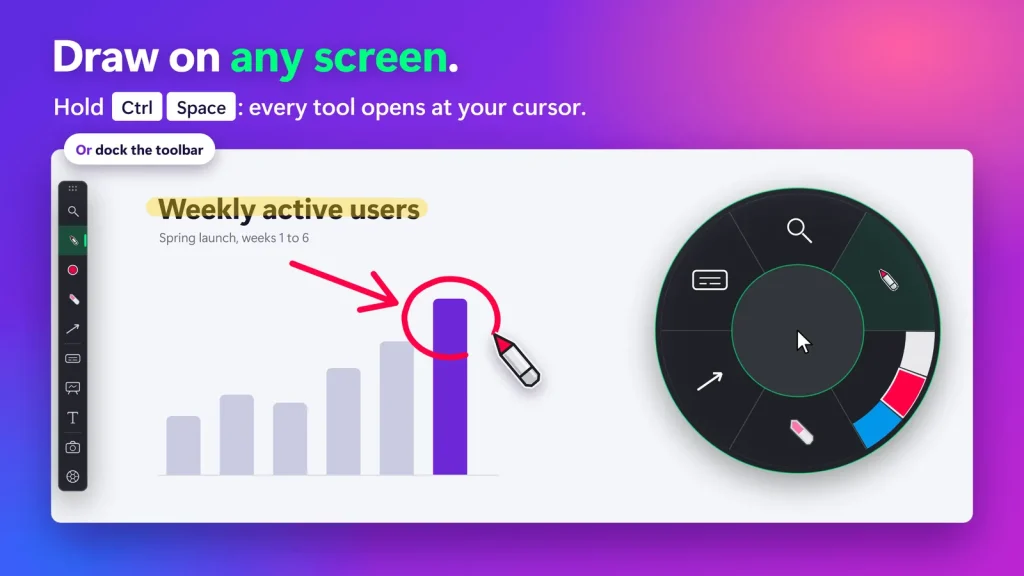
No, Presentify is macOS-only ($14.99 on the Mac App Store) with no Windows version available. SHARA is our top-recommended Presentify alternative for Windows. Its free core tier gives you a cursor halo with a click flash, live drawing (Pen, Laser, Eraser, Arrow, Text labels), screenshots, and every tool in a docked toolbar or a radial HUD wheel. Every download includes 14 days of Pro (or $19.99 for Lifetime Pro). On Windows, SHARA matches Presentify’s cursor and zoom features while adding live keystroke overlays, 3D halo depth, and a vertical 9:16 broadcast window for OBS.
Why isn’t Presentify available on Windows?
Presentify (by Softal Limited) is a popular macOS screen annotation and presentation tool sold on the Mac App Store for $14.99. If you have recently switched from Mac to PC, started using a corporate Windows laptop, or built a PC-first production rig, you might be searching for “Presentify Windows download.”
The short answer is: Presentify does not run on Windows, and no PC port exists. Presentify is built deeply into macOS frameworks (AppKit, SwiftUI, Apple Accessibility APIs, and macOS display compositing). Running it inside a virtual machine or compatibility layer adds performance overhead and input lag that ruins live presentations.
To get the same sleek pointer guidance, screen zooming, and drawing on Windows, you need a native Windows tool designed for low-latency desktop graphics.
Presentify for Windows: Top alternatives compared
| Alternative | Best reason to switch | Price / model | Main tradeoff |
|---|---|---|---|
| SHARATop Pick | Clicks, keys, zoom, spotlight, whiteboard, toolbar, Wheel, and 9:16 OBS framing | Free Core Edition $19.99 Pro Lifetime | Mac version not available (Windows native) |
| Presentify | Clean Mac app with cursor highlighting, drawing, whiteboard, spotlight, and zoom | $14.99 one-time (Mac App Store) | Mac only; no keystroke overlay listed |
| ZoomIt | Free Microsoft utility with live recording, OCR, and break timers | Free | Keyboard-driven technical tool, not a styled overlay |
| ppInk | Deep open-source toolbox and fully custom annotation profiles | Free (MIT) | Slower to configure; Windows 24H2 Ink bug to check |
| Cursor Pro | Minimalist halo with animated click pulses and basic magnifier | Free + paid | Lacks keystroke overlay and advanced presentation tools |
| gInk | Simple, lightweight, clutter-free open-source drawing | Free (OSS) | Very minimal feature set versus premium options |
SHARA – best Presentify alternative for Windows
If you love Presentify’s clean aesthetic on macOS but need a solution for Windows, SHARA is the closest native replacement. It combines cursor guidance, magnification, and live drawing into a single, GPU-accelerated Windows overlay.
While Presentify focuses on Mac-centric desktop markup, SHARA addresses a broader challenge faced by online instructors, software creators, and remote presenters: making your actions effortless to follow across screen recordings and live streams.
What SHARA adds that Presentify doesn’t have
While Presentify is a polished Mac app, switching to SHARA on Windows actually unlocks several key features Presentify lacks, ordered here by importance for creators and demoers:
1. Smart Keystroke Visualization
Presentify shows your cursor and ink, but its feature list has no display for the hotkeys or shortcuts you press. SHARA (Pro, included in the 14-day trial) includes an animated Smart Keystroke Pill that floats near your pointer. It automatically filters single letters during regular typing while highlighting key combos (e.g., Ctrl+Z, Alt+Tab). Crucially, it detects secure password fields and hides sensitive keypresses automatically.
2. Ctrl+Space Radial Quick-Action Wheel
Instead of memorizing dozens of separate hotkeys, holding Ctrl+Space opens SHARA’s radial wheel directly at your pointer. You can switch from Pen to Magnifier, adjust ink colors, or drop a Text label with a single quick wrist movement without taking your eyes off your content. Prefer icons? The same tools sit in a docked toolbar at a screen edge.
3. Cursor-Following 9:16 Vertical Broadcast Window
For video creators producing short-form content (TikTok, YouTube Shorts, Instagram Reels), SHARA Pro offers a dedicated 9:16 vertical broadcast window that smoothly tracks your mouse pointer. You can drop this window directly into OBS Studio as a source, instantly turning desktop walkthroughs into portrait tutorials.
4. 3D Tilt Velocity & Dynamic Glow
Presentify’s cursor highlight is a ring, squircle, or rhombus. SHARA offers the same three shapes, and in Pro the halo reacts to mouse movement with a subtle 3D perspective tilt that gives the cursor a natural weight and feel. Pro also adds dashed borders and glow, while the free halo covers shape, size, color, and a click flash.
Presentify gives Mac users cursor highlighting, zoom, and drawing for $14.99. SHARA gives Windows users the same core jobs – plus live keystrokes, 3D tilt, a docked toolbar and radial HUD wheel, and vertical 9:16 OBS framing – starting free, or $19.99 once for Pro.
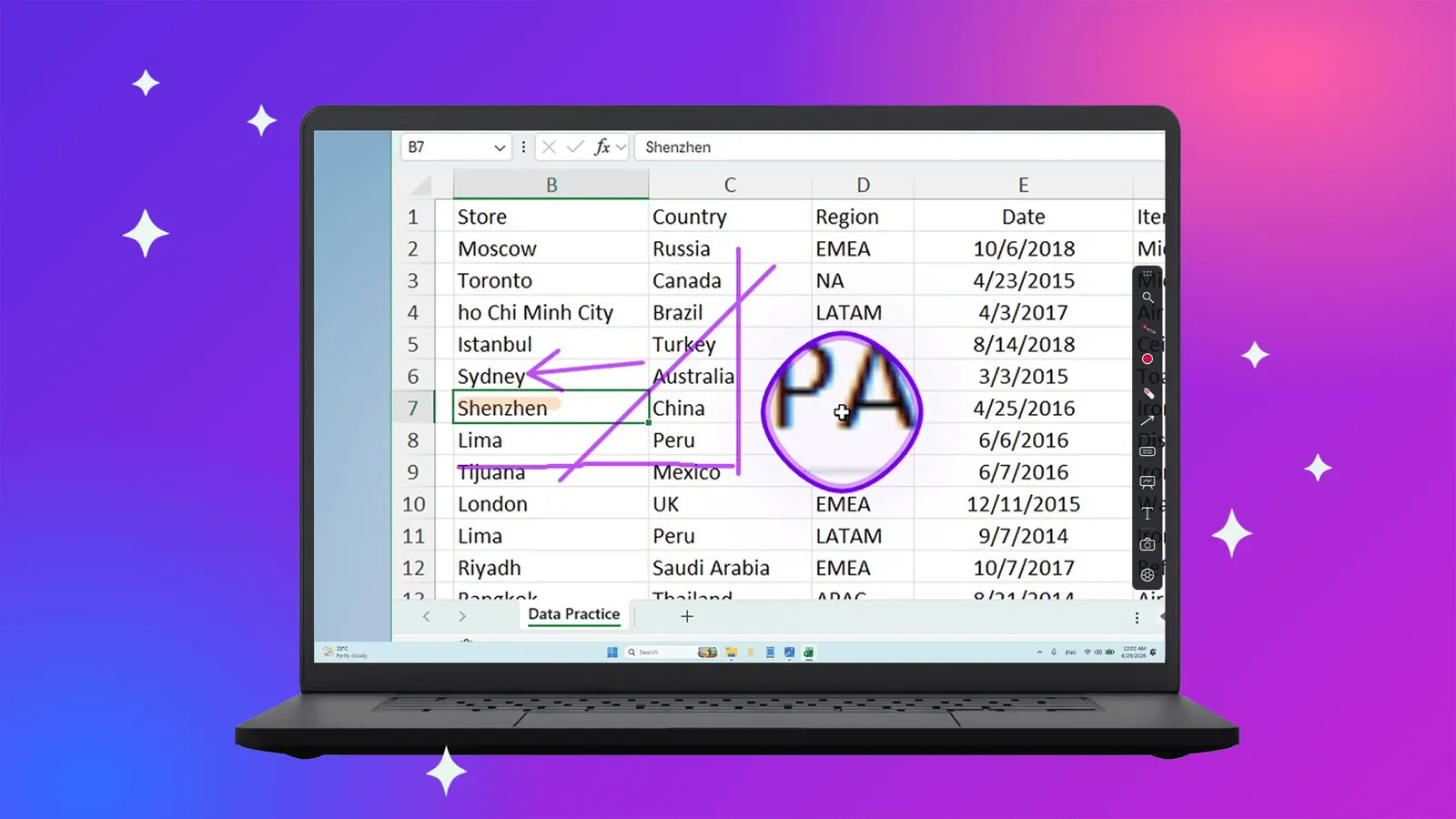
Feature-by-feature breakdown
Here is how Presentify on Mac compares to SHARA on Windows across core presentation capabilities:
| Feature | Presentify (macOS) | SHARA (Windows) |
|---|---|---|
| Platform | macOS 13+ only | Windows 10 & 11 |
| Cursor Halo Shapes | Circle, squircle, rhombus | Circle, squircle, rhombus |
| Halo Effects & 3D Tilt | Customizable halo | Pro: 3D tilt, glow, border styles |
| Click Indicators | Left and right click animations | Click flash; Pro: ripple, L/R colors |
| Keystroke Overlay | None listed | Pro: Keystroke Pill + Password Masking |
| Screen Zoom | Zoom follows the cursor | Pro: Lens, Live Zoom, Spotlight |
| Screen Drawing & Shapes | Pen, highlighter, text, shapes | Pen, Laser, Eraser, Arrow, Text; Pro: Highlighter, shapes |
| Whiteboard | Yes | Pro: white, black or grid board |
| Screenshots | None listed | Built in, free |
| Toolbar & Wheel | No radial wheel | Docked toolbar + Ctrl+Space Wheel |
| OBS Vertical Framing | None | Cursor-following 9:16 broadcast window |
| Data Privacy | No data collected | No telemetry; online only to buy Pro |
| Price / Model | $14.99 one-time (Mac App Store) | Free forever core · Pro $19.99 once |
How to switch from Presentify to SHARA on Windows
Setting up your presentation workspace on Windows takes less than two minutes:
- Download SHARA Free from the Microsoft Store. It installs cleanly as a lightweight package with no administrative driver prompts.
- Select your Cursor Halo: Open SHARA settings and select Squircle or Circle to replicate Presentify’s default pointer style, then set distinct colors for left and right mouse clicks (Pro, included in your 14-day trial; the click flash itself is free).
- Enable the Ctrl+Space Wheel & Keystrokes: Hold Ctrl+Space anytime to open the radial wheel HUD, or use the docked toolbar. Enable the Smart Keystroke Pill to show keyboard shortcuts automatically during your recordings.
FAQ
Is there a Presentify for Windows?
No. Presentify is a macOS-only app (macOS 13 or later) developed by Softal Limited, available on the Mac App Store for $14.99. There is no Windows version, no PC port planned, and no way to run Presentify natively on Windows PCs. SHARA is the top Windows alternative, delivering cursor highlighting, live zoom, keystroke visualization, and screen annotation.
What is the best Presentify alternative for Windows PCs?
SHARA is the best Presentify equivalent on Windows. It combines cursor highlighting, a click flash, live screen markup, a docked toolbar or Ctrl+Space Wheel, precision magnification, a whiteboard, and an animated keystroke visualizer in one lightweight app.
How much does Presentify cost compared to SHARA?
Presentify costs $14.99 on the Mac App Store. SHARA provides a free-forever core tier (cursor halo with click flash, Pen, Laser, Eraser, Arrow, Text labels, screenshots, the docked toolbar, and the Ctrl+Space Wheel). Every install includes 14 days of Pro access, and an optional Pro upgrade costs $19.99 once with no ongoing subscription.
Does SHARA include screen drawing and annotation like Presentify?
Yes. SHARA includes a complete built-in annotation toolset. Free tools include Pen, Laser, Eraser, Arrow, Text labels, and one saved color per tool; Pro unlocks Highlighter, Line, Rectangle, Circle, Whiteboard, and color sets.
Does Presentify or SHARA show keystrokes on screen?
Presentify’s feature list has no keystroke overlay. SHARA Pro (included in the 14-day trial) has a Smart Keystroke Pill that shows shortcuts (like Ctrl+S, Alt+Tab) automatically as you press them, with auto-detection that masks sensitive password fields.
Is SHARA a one-time purchase or a subscription?
SHARA is free to download and keep forever. The optional Pro upgrade is a $19.99 one-time purchase with no recurring subscription fees.
Disclosure and methodology: Mashyo makes SHARA. We checked Presentify’s website and Mac App Store listing on 17 October 2026; SHARA’s Free and Pro tiers come from the app itself. Prices and features are based on public specs on the Mac App Store and Microsoft Store. Confirm current pricing on each vendor’s site before purchasing.
About the author: Mashyo builds practical Windows tools for creators and educators. Last updated: October 17, 2026.