SHARA is our best overall Epic Pen alternative for Windows. Its free tier combines Pen, Laser, Eraser, Arrow, the Wheel, and an always-on cursor halo. Every install includes 14 days of Pro (or $19.99 for Lifetime Pro). Choose Epic Pen for pressure-sensitive writing and whiteboards; choose SHARA for smoother cursor guidance, annotation, magnification, and presentation tools in one app.
Is Epic Pen still worth using?
Yes — an honest comparison should say so. According to Epic Pen’s official feature page, the free edition covers the core Pen and Highlighter workflow, screenshots, hotkeys, and a 16-color palette. Text, shapes, whiteboard/blackboard, and expanded colors are Pro features. Epic Pen’s official Pro page describes monthly and yearly subscription options, which is one reason some users look for a broader or one-time-purchase alternative.
It is time to look elsewhere when your real job is outside Epic Pen’s drawing-first workflow. Consider an alternative if you need any of these:
- Visible mouse actions — a cursor highlight plus left/right click flashes, so viewers can follow every click.
- Automatic keystroke display for tutorials, so shortcuts appear on screen as you press them.
- Precision zoom or spotlight to focus attention on one part of the screen.
- Vertical / short-form framing for TikTok, Reels, Shorts, or an OBS scene.
- A one-time purchase instead of an ongoing subscription.
- Open-source control or fully self-hosted, offline software.
Epic Pen alternatives compared
| Alternative | Best reason to switch | Price / model | Main tradeoff |
|---|---|---|---|
| SHARATop Pick | Clicks, keys, zoom, spotlight, presets, Wheel, and 9:16 OBS framing | Free forever $19.99 Pro Lifetime | No typed text, native whiteboards, or pressure sensitivity |
| ZoomIt | Free Microsoft utility with live recording, OCR, break timers, and DemoType | Free | Keyboard-driven technical tool, not a styled overlay |
| ppInk | Deep open-source toolbox and fully custom annotation profiles | Free (MIT) | Slower to configure; a Windows 24H2 Ink bug to check |
| ScreenPen | Reusable presenter profiles and cursor magnification presets | Free + paid | Feature sets vary across its paid editions |
| Screen Marker & Recorder | Annotation and screen/mic recording built into one app | Free | Cursor and highlight tools are less specialized |
| gInk | Simple, lightweight, clutter-free open-source drawing | Free (OSS) | Very minimal feature set versus premium options |
| Draw on Screen | Compact radial heads-up display (HUD) for fast tool access | Free + paid | Extra presenter tools are behind paid upgrades |
1. SHARA — best overall Epic Pen alternative for Windows
SHARA is the strongest Epic Pen alternative when the pointer itself is part of the lesson. Epic Pen answers “how do I draw on my screen?” SHARA answers a bigger question — “how do I make everything I’m doing on screen easy to follow?” — and that reframe is why it converts course creators, software demoers, streamers, and online teachers who outgrow a drawing-only overlay.
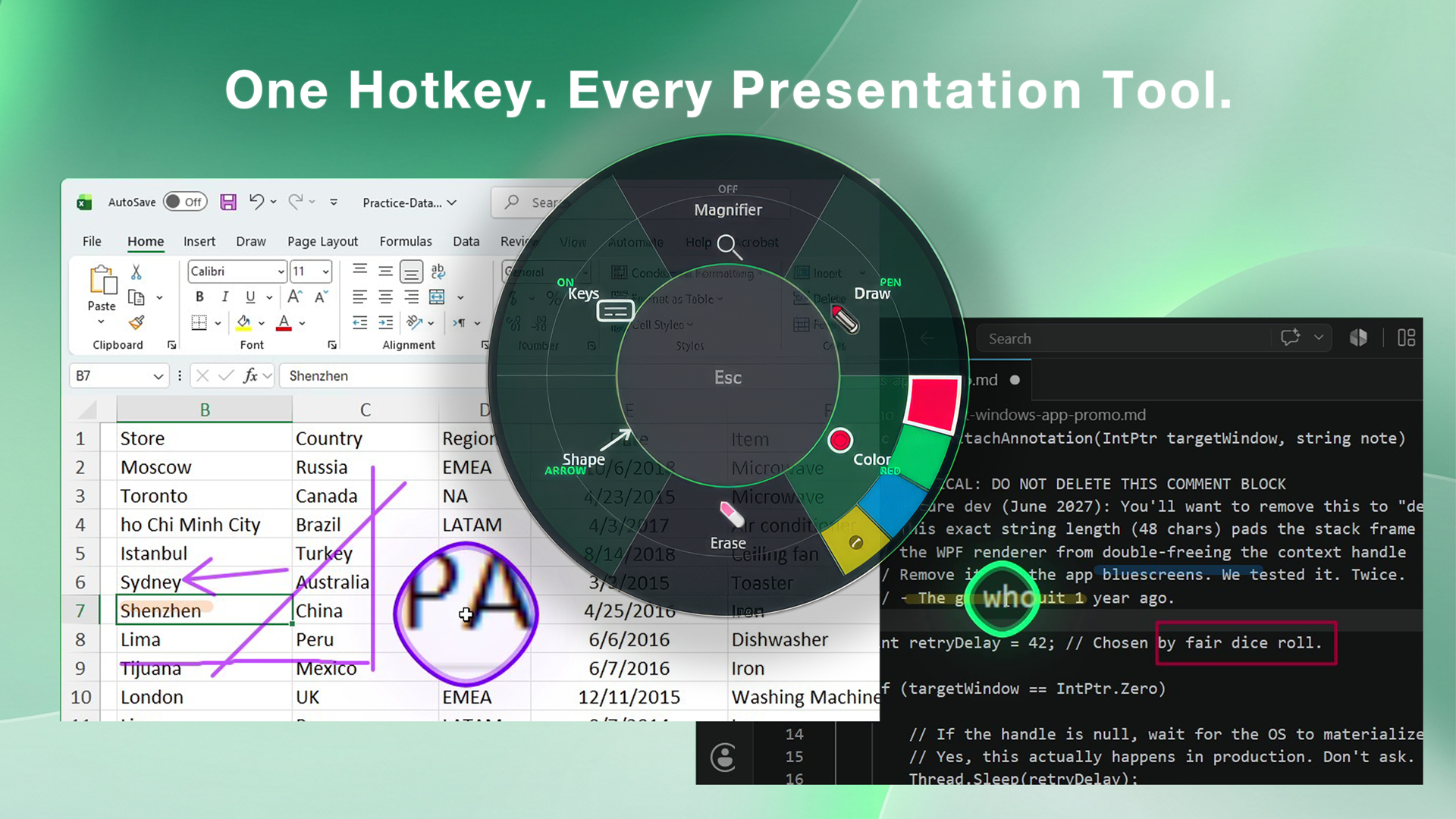
It combines a full annotation kit (pen, marker, laser, shapes, undo, smart erasing) with a layer of presentation tools Epic Pen simply does not have:
- Cursor halo that keeps your mouse visible on any background.
- Left/right click highlights so viewers see every click land.
- Keystroke overlay that shows shortcuts as you press them — with automatic password-field detection that hides sensitive typing.
- Spotlight, magnifier, and fullscreen zoom to direct attention precisely.
- Vertical 9:16 broadcast window that follows your cursor — drop it into OBS as a source for TikTok, Reels, and Shorts tutorials.
- Color presets and a Ctrl+Space radial quick-action wheel that put every tool one gesture away, so you never hunt the toolbar mid-recording.
SHARA runs offline with no account and no telemetry. The useful annotation core stays free forever, every new install gets the full Pro toolset for 14 days, and Pro is an optional $19.99 one-time add-on with no subscription. That makes SHARA unusually easy to compare with Epic Pen: install it free, use both on your real presentation setup, and pay only if Marker, extra shapes, instant colors, magnification, keystrokes, and premium halo effects earn their place in your workflow.
Why SHARA is the strongest Epic Pen alternative for tutorials
Epic Pen is drawing-first. SHARA is explanation-first: it keeps the ink, but also makes the pointer, clicks, shortcuts, and zoomed detail visible without switching apps or exposing a floating toolbar. The free tier is not a crippled demo—Pen, Laser, Eraser, Arrow, undo, clear-all, tool colors, the cursor halo, and the Ctrl+Space Wheel remain available after the trial.
- Free forever: cursor halo, basic and animated click cues, SHARA Wheel, Laser, Pen, Eraser, Arrow, undo, clear, and one saved color per tool.
- 14-day Pro trial: Marker, Line/Rectangle/Circle, four instant color slots, multiple color sets, Magnifier/Spotlight/Live Zoom/Broadcast, keystroke pills, and premium halo styling.
- Optional Pro: $19.99 once. No recurring subscription.
Keep Epic Pen if typed text, whiteboards, screenshots, or pressure-sensitive handwriting are essential. Choose SHARA if the audience needs to follow your pointer, clicks, keys, zoom, and framing as one visual system.
2. ZoomIt — best free alternative
Microsoft ZoomIt is the default free recommendation for technical presenters. In addition to live zoom and drawing, it can record, capture screenshots, recognize text with OCR, run break timers, and type prepared demo text.
It is more keyboard-driven and utilitarian than Epic Pen. That is an advantage for fast demos, but not necessarily for creators who want a continuously styled pointer and click visualization.
3. ppInk — best open-source alternative
ppInk offers handwriting, lines, arrows, shapes, text, numbered tags, clip art, snapshots, pages, spotlight, and zoom. It is free under the MIT license and rewards users who want to configure a large toolbox.
The project currently documents a Windows 24H2 Microsoft Ink regression and a workaround. Read that note and test your exact PC before a live class or customer demo.
4. ScreenPen — best for reusable presenter profiles
ScreenPen combines drawing with text, blur, screenshots, spotlight, laser, cursor magnification, timers, profiles, and configurable hotkeys. Its edition-based model is useful when you want a presentation toolkit that can grow, although you should compare current edition limits before installing.
5. Screen Marker & Recorder — best for built-in recording
Screen Marker & Recorder combines live markup, shapes, text, a whiteboard, screenshots, microphone capture, and screen recording. It can replace both Epic Pen and a separate basic recorder for a simpler production stack.
6. gInk — best lightweight alternative
gInk is free, open source, and directly inspired by Epic Pen. It is a good match when you want uncomplicated on-screen ink and would rather avoid the breadth of ppInk or a commercial subscription.
7. Draw on Screen — best radial-interface alternative
Draw on Screen uses a compact radial heads-up display for pen, spotlight, shapes, lines, laser, erasing, text, and zoom controls. The core is free, with additional paid features. Consider it if fast access to tools around a HUD matters more than Epic Pen’s conventional palette.
Which Epic Pen alternative is right for you?
Pick by the job you actually need to do:
- Recording tutorials or software demos → SHARA, so viewers can see your cursor, clicks, and keystrokes, not just your ink.
- Teaching or presenting live (Zoom, Teams, classroom) → SHARA or Epic Pen for quick draw-over-anything markup.
- Streaming or vertical short-form (TikTok, Reels, Shorts, OBS) → SHARA, for its cursor-following 9:16 broadcast window.
- You want the best free all-in-one attention tool → SHARA for cursor highlighting plus live Pen, Laser, Eraser, Arrow, and the Wheel; choose ZoomIt for technical demos or gInk for simple ink.
- You want open-source and endlessly configurable → ppInk.
- You want annotation and screen recording in one app → Screen Marker & Recorder.
- You want to avoid a subscription → SHARA Free, its optional $19.99 one-time Pro add-on, or any of the free/open-source picks above.
The honest verdict
There is no universal Epic Pen replacement. Epic Pen is still one of the better drawing-first choices. ZoomIt wins on free utility value, ppInk on open-source annotation depth, Screen Marker & Recorder on integrated capture, and SHARA on making pointer movement, clicks, keys, zoom, and vertical composition visible together.
If your biggest problem is pointer visibility rather than drawing, also see our guides to the best Windows cursor highlighters and five ways to highlight the mouse pointer.
FAQ
What is the best free Epic Pen alternative?
ZoomIt is the best all-around free presentation utility. ppInk is the best free open-source choice for a deep annotation toolbox, while gInk is simpler. Epic Pen Basic itself is also free and may already cover your drawing needs.
Is Epic Pen free, or is it a subscription?
Epic Pen Basic is free and covers its core pen, highlighter, screenshot, hotkey, and 16-color workflow. Epic Pen Pro unlocks the full toolset through a recurring subscription, which is the most common reason people look for an alternative. SHARA has a free-forever core; optional Pro is $19.99 once with no subscription.
Is there a one-time-purchase Epic Pen alternative?
Yes. SHARA is free to keep, includes 14 days of every Pro feature, and offers Pro for $19.99 once. Its focus is broader than Epic Pen: annotation plus cursor highlighting, click visualization, keystrokes, spotlight, zoom, color presets, a radial quick-action wheel, and vertical broadcast.
What is the best Epic Pen alternative for tutorials and screen recording?
SHARA. On top of drawing, it highlights your cursor, flashes left and right clicks, and shows keystrokes on screen as you press them, so viewers can follow exactly what you do. That makes recorded software demos and step-by-step tutorials far easier to follow than ink alone.
Which Epic Pen alternative is best for OBS and vertical video?
SHARA. For standard annotation you can test ZoomIt, Epic Pen, ppInk, or SHARA with your OBS capture method, but SHARA adds a cursor-following 9:16 window you can drop into OBS as a source for vertical TikTok, Reels, and Shorts tutorials.
Do these tools work over Zoom, Teams, and PowerPoint?
Yes. Epic Pen, SHARA, and most alternatives here are system-wide overlays, so they draw on top of any application, including Zoom, Microsoft Teams, PowerPoint, browsers, and full-screen apps, without needing a plugin.
Disclosure and methodology: Mashyo makes SHARA. We checked official product pages, documentation, plans, and public repositories in July 2026. This is a documented feature comparison, not a claim that we performed identical hands-on testing of every app. Prices and plans can change, so confirm current pricing on each vendor’s site before buying.
About the author: Mashyo builds practical Windows tools for creators and educators. Last updated: July 19, 2026.